Internet Explorer version 5 and later offer the ability for heighten security and privacy. You can block a site by following the directions below: 1. Load your Internet explorer Speed Up Your Computer in minutes, Click here! This action will require you to edit your Host file. Your host file is a computer file used to store information on where to find a node on a computer network. For more a more detailed description. Check out this link Host File Description Link In Windows XP 1. Click Start->All Programs->Accessories->Command Prompt. 127.0.0.1 google.com You can add as many sites any site, However you will need to prefix it with "127.0.0.1".How to block a Website using Internet Explorer
2. Click Tools
3. Click Internet Options
4. Click the Privacy tab
5. Under the Privacy window, Click Sites
6. Type in the site address that you want to Block and Click OK. Remember this technique only blocks on one site at a time. Parental control software will allow you to block multiple sites and categories.
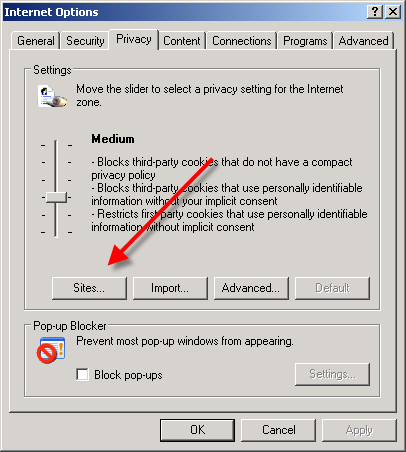
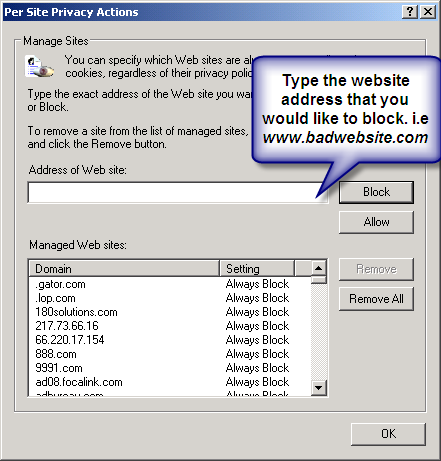
Here are alternate instructions to block a website using Internet Explorer.
Tools ->Internet Options->Security->Restricted sites->Sites->Type in the site address and Click ADD then click OKHow to Block A Website in All Web Browsers
2. Click Command Prompt This will open a DOS command window.
3. Type: notepad C:/Windows/System32/drivers/etc/hosts
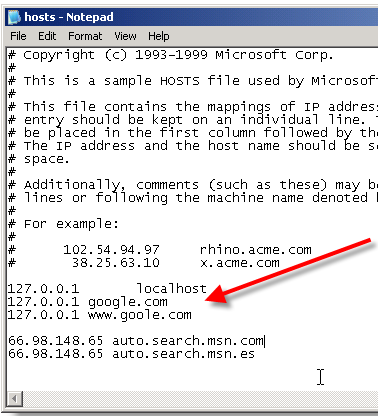
4. Locate the line 127.0.0.1 localhost
5. To block the website google.com for example, just add this text under 127.0.0.1 localhost:
127.0.0.1 www.google.com
6. Save the file
Google will now be blocked in all web browser. This is an advanced but easy method on how to blow a website. 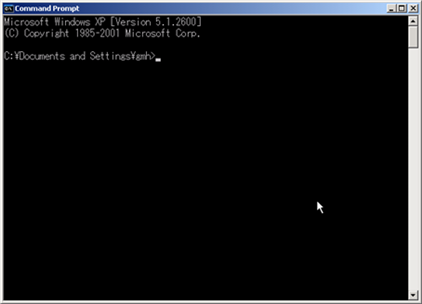


Root and unroot using bluestack easy
6 years ago


 Posts
Posts


why you want to block website leh?
~fun~
haha, just learn la.
dunwan mie?